

API-First retail execution software integration for
multi-location retailers
RETAIL EXECUTION SOFTWARE
OpsEngine gives retail IT teams and operations leaders full API access to OPSCENTER — so you can connect your existing retail tech stack, automate store execution workflows, or build an entirely custom front end powered by OPSCENTER running behind it.













RETAIL INDUSTRIES SERVED
What your retail tech team can build with OpsEngine
OpsEngine was designed to give enterprise retailers the flexibility to integrate OPSCENTER into their stores' existing workflows, rather than forcing a new workflow on top of existing systems.
Surface Tasks Inside Your Inventory or Ordering App
Build a task summary view directly inside the app your store teams already use. Associates view and complete tasks without switching platforms. No extra login, no context switching.
Display Store Messages on Your POS Screen
Push OPSCENTER messages directly onto your POS display so store associates stay aligned in real time, at the point of sale, where they are already working. Opterus partners with GK Software for native POS integration.
Build Custom Compliance Dashboards in Third-Party Analytics Tools
Pull OPSCENTER store compliance and execution data into any analytics or business intelligence platform your HQ team uses. See the data where your decisions get made.
Run a Complete Retail Operations System on OPSCENTER as the Backend
Build your own task management and communications user interface for your organization and let OpsEngine power everything underneath it. Your brand, your interface, OPSCENTER doing the work.
Automate AI-Powered Retail Workflows
With our GraphQL API suite, your AI tools can request and receive OPSCENTER data on demand. Ask for a report on stores with overdue tasks. Pull execution summaries by region. Trigger workflows automatically based on store performance signals.
OPSCENTER is API-first. That means every action available in the platform interface is also available through the API. Nothing is locked away.
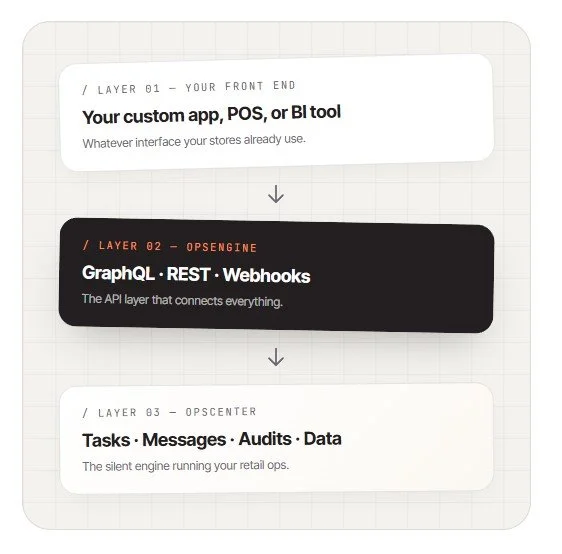
OpsEngine is the suite of APIs that gives your team programmatic access to every feature in OPSCENTER. You can use it to pull specific data, trigger specific actions, or go further and build an entirely custom interface that treats OPSCENTER as the silent engine running your retail operations in the background.
Your team keeps the front end they want. OPSCENTER powers the execution behind it.
The API layer
behind OPSCENTER
retail execution
READY WHEN YOU ARE
Ready to connect OPSCENTER to
your retail tech stack?
Our team works directly with your IT and operations leads to map out the right integration approach for your store network.
How to implement OpsEngine: retail workflow automation API options
API TECHNOLOGY OPTIONS
GraphQL
The primary API for accessing OPSCENTER. GraphQL lets your team build highly efficient integrations that query only the data you need — no unnecessary payloads, no redundant calls. Every OPSCENTER feature and data point is accessible through GraphQL, making it the recommended choice for new integrations and advanced AI workflows.
REST
Used for authentication. Your system performs a REST call to receive the credentials needed to access the GraphQL API. Only authenticated users can execute these calls, keeping your integration secure at every layer.
Webhooks
Subscribe your apps and integrations to OPSCENTER events and receive real-time notifications the moment something changes. No polling. No overnight batch delays. When a task is completed, a message is sent, or an audit is submitted, your connected systems know immediately.
WebServices
For teams running legacy platforms or existing integrations built before GraphQL adoption, OPSCENTER continues to support WebServices. Your current integrations stay functional while you plan any future migration at your own pace.
Batch Upload Utilities
Operations teams can bulk upload messages and synchronize user accounts across all locations using our Batch File Uploader and Synchronizer utilities. No internal development project required. Built for operations users who need to move data at scale without involving IT.
Virtual Email
OPSCENTER generates virtual email addresses for every store, role, and hierarchy level in your organization. Send information to a specific district, a store tier, or a role group simply by addressing an email to the right address. Secure with a whitelist of approved senders.
OpsEngine gives your development team multiple integration paths depending on your infrastructure, your existing platforms, and the complexity of what you are building.
RETAIL TECHNOLOGY PARTNERS
A partner ecosystem
built for enterprise
retail execution
OpsEngine integrates with the enterprise retail platforms your organization already runs. Opterus works with strategic solution providers and system integrators to deliver a fully connected single platform experience.

Surface OPSCENTER messages and tasks directly on GK-powered point of sale screens for real-time frontline alignment.
Visit GK Software
Connect OPSCENTER to IBM-powered retail environments for scalable, secure enterprise operations.
Visit IBM Retail
Bring scheduling, labor data, and category planning into one connected retail operations layer.
Visit Blue Yonder
Align store scheduling and labor planning with OPSCENTER task execution for a complete store operations view.
Visit Legion
Integrate OPSCENTER with SAP environments to connect back-office operations with frontline store execution.
Visit SAP
Work with Accenture to implement OPSCENTER as part of a broader enterprise retail transformation.
Visit AccentureGET STARTED WITH OPSENGINE
Connect your retail execution stack
with OpsEngine
Multi-location retailers use OpsEngine to break down the walls between their retail systems and build a connected, automated, high-performing store operation.
One API layer. Every integration your retail tech team needs.